
Edit on the page
Click any paragraph, heading, list item or table cell and type. Bold, italic, new paragraphs and extra list items work as well.
For HTML that AI tools write
Open the file, click a sentence and retype it. When you save, the words you changed are the only thing in the file that is different. If Claude or ChatGPT regenerates the file afterwards, VibeRevise brings your fixes across and highlights what the AI changed.
Open the web app The Chrome extension isn’t in the Chrome Web Store yet.
Free while it’s in beta. No account, and your files stay on your computer.
The file changed outside VibeRevise. 3 changes brought in. Your 2 fixes kept.
We launch in Brisbane and the Gold Coast with two staff and a contractor.
Revenue comes from a monthly subscription, with a free tier for single properties.
Hiring starts once the first fifty customers are paying.
Your fixChanged by the AI
01 · Why it exists
AI tools are good at turning out reports, plans and pages as HTML. They are not as good at getting every sentence right, and when you ask them to fix one line they tend to rewrite twenty.
Fixing it yourself usually means a code editor and a lot of scrolling through markup. Most visual HTML editors are worse: they load the page and write it back out in their own style, so a fix to one word comes back as a file where every line has moved.
VibeRevise only edits the text. Your indentation, comments, entities and attribute quoting are kept exactly as they were, so a diff of the saved file shows the words you changed and nothing else.
<section class="plan"> <!-- reviewed with finance, 3 Oct -->- <p>We launch in Brisbane with two staff and a contractor.</p>+ <p>We launch in Brisbane and the Gold Coast with two staff and a contractor.</p> </section>02 · Features
Click any paragraph, heading, list item or table cell and type. Bold, italic, new paragraphs and extra list items work as well.
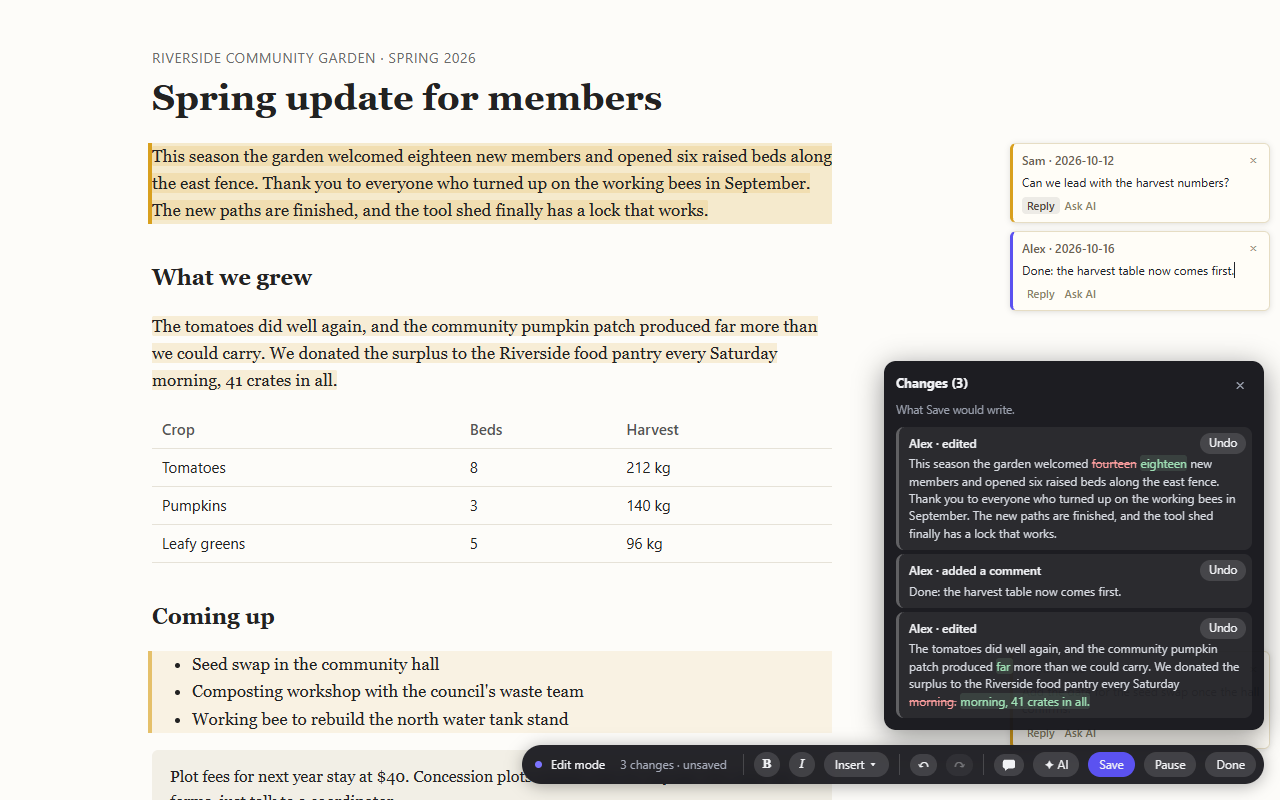
If another program rewrites the file while you have it open, VibeRevise loads the new version, carries your unsaved edits across and highlights what changed so you can check it.
A list shows each edit, who made it and the exact words that changed. You can undo any one of them and keep the rest.
Notes sit in the margin and are saved inside the file as ordinary HTML comments, so they travel with it.
In Chrome and Edge, Save writes straight back to the file you opened. A server on your own network can accept saves in place as well.
03 · AI
AI is off until you add your own API key for Anthropic, OpenAI, OpenRouter, Google Gemini or a model running on your own computer. You pay the provider directly. With a key added you can ask it to explain a passage, proofread the document, suggest a rewrite or draft a reply to a comment.
Out of the box it can only make suggestions, which you read and then act on yourself. If you switch it to Read and write, its suggestions get an Accept button and nothing changes until you press it. Every change the AI takes part in is listed under the name of the model.
The default
AI explains, reviews and proposes wording. You copy what you like. It cannot touch the file.
If you switch it on
Each suggestion gets an Accept button. Nothing changes until you press it, and every accepted change is listed under the model’s name.
04 · Questions
No. VibeRevise opens and edits the document in your browser, and there is no VibeRevise server to send it to. If you turn on AI, the paragraphs you ask about go to the AI service you picked, and only when you press the button.
The web app runs in any current browser. In Chrome or Edge on a computer, Save writes back to the file you opened. Other browsers download the edited copy for you to save yourself.
Layout, styles and images are left alone. VibeRevise changes words, and can add paragraphs, lists, tables, bold and italic in the same style as the ones already in the document. Pages that build their text with JavaScript can’t be edited, because the words aren’t in the file.
No. All the editing works without it, and AI stays off until you add a key.
Yes, while it’s in beta, with no account and no card. If that ever changes, it will be announced on this page first. AI usage is billed by your AI provider at their prices; VibeRevise adds nothing.
Open the web app The Chrome extension isn’t in the Chrome Web Store yet.